Logitech G502 X Glass Skates Guide: Fit, Feel & Pad Choice
- SIKAI Editorial Team

- 14 minutes ago
- 3 min read
Glass mouse feet can make a heavy, multi-button mouse feel easier to start and sweep, but G502 naming creates a real buying trap. This guide is specifically about EnergyFort glass skates for Logitech G502 X LIGHTSPEED and G502 X PLUS—not the wired G502 X, G502 HERO, or older G502 LIGHTSPEED.
The short answer
These skates suit owners of the two supported wireless G502 X models who use a clean cloth mouse pad and deliberately want a faster, lower-friction feel. PTFE remains the better default for people who want more stopping feedback or use hard, resin, or glass surfaces.

First: identify the exact mouse
Logitech's G502 family includes several underside layouts. EnergyFort lists compatibility only with G502 X LIGHTSPEED and G502 X PLUS. The wired G502 X may share the generation name, but this particular skate set is explicitly not compatible.
Compatible: Logitech G502 X LIGHTSPEED.
Compatible: Logitech G502 X PLUS.
Not compatible: wired Logitech G502 X.
Not compatible: Logitech G502 HERO or the earlier G502 LIGHTSPEED.
Glass versus PTFE: choose a feel, not a slogan
Polished glass generally lowers initial resistance on a suitable cloth pad. That can make wide swipes and small corrections feel lighter. PTFE usually provides a more familiar balance of speed and braking and tends to be less demanding about pad choice. Neither material guarantees better aim; sensitivity, technique, pad texture, dust, and hand pressure still shape the result.
Your mouse pad is part of the decision
EnergyFort recommends cloth mouse pads and compatible gaming surfaces. Keep the pad clean and dry because grit or moisture can change glide. Do not pair these glass skates with a glass mouse pad, resin pad, or bare desktop. Hard-on-hard contact is outside the intended use.
What the EnergyFort set offers
A model-specific layout for G502 X LIGHTSPEED and PLUS.
Polished glass surfaces intended to reduce sliding resistance.
Rounded edges designed for smoother transitions when installed flat.
Black and white variants.
One replacement skate set; mouse and pad are not included.

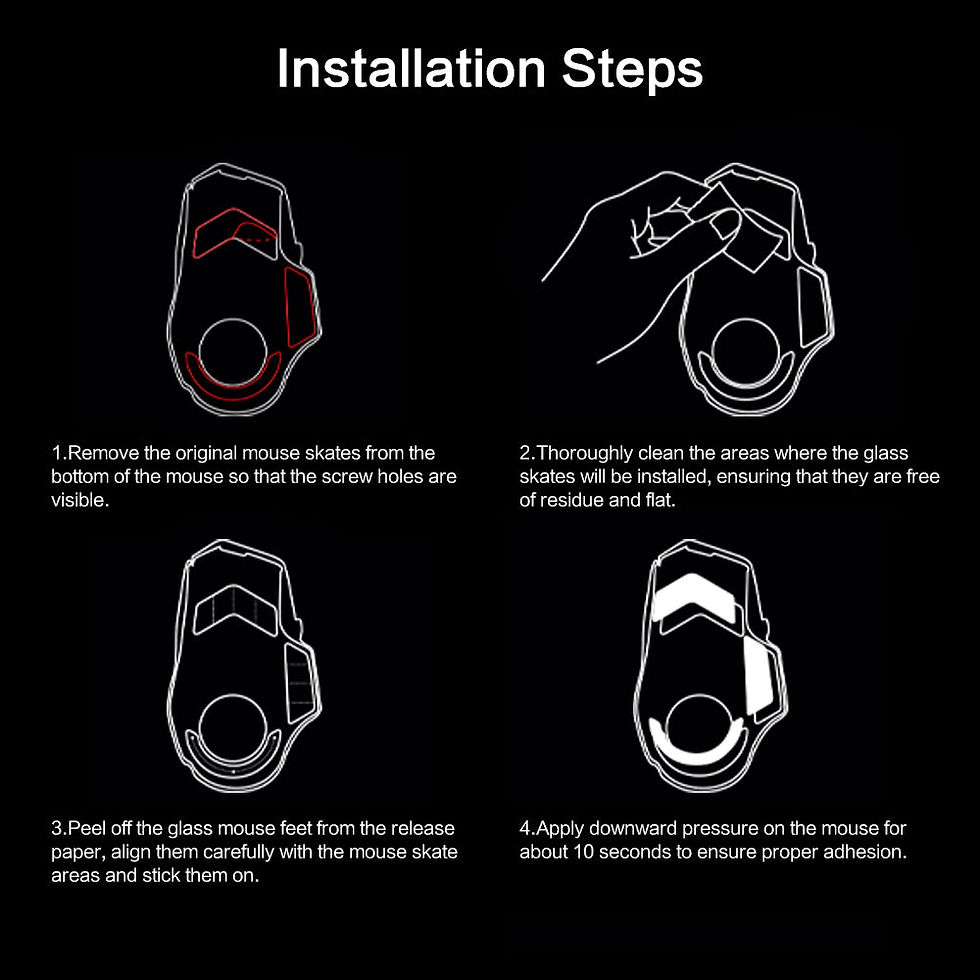
Installation checklist
Power off the mouse and confirm its exact model.
Remove every original foot carefully.
Clean away old adhesive so each recess is dry and flat.
Compare every new piece with its recess before exposing adhesive.
Align once, press evenly, and avoid repeated peeling.
Test gently on a clean cloth pad; stop if the mouse rocks or scratches.
Do not stack new skates on old feet. An uneven base or changed sensor-to-pad distance can affect tracking.

Who should buy them?
They make the most sense for G502 X LIGHTSPEED or PLUS owners who already enjoy speed-oriented glide and maintain a cloth-pad setup. They may not suit control-focused players, users who press heavily into the pad, or anyone switching regularly among hard surfaces.
Frequently asked questions
Do they fit the wired G502 X?
No. This EnergyFort set specifically excludes the wired model.
Do they fit the older G502 LIGHTSPEED?
No. G502 X LIGHTSPEED and the earlier G502 LIGHTSPEED are different mice with different skate layouts.
Can I use them on a glass pad?
No. EnergyFort does not recommend glass, resin, or bare-desktop use.
Will they improve aim?
They change friction and feel, but improvement depends on the player's settings, pad, and practice.
Are they always faster than PTFE?
They commonly feel faster on clean cloth, but texture, moisture, and pressure can change the result.
What is included?
One set of glass mouse skates in the selected black or white variant.
Can I install over the stock feet?
No. Remove the old feet and adhesive residue first.
What if the mouse rocks after fitting?
Stop and inspect for residue, misalignment, or an incompatible surface before continuing.
Verdict
This is a focused speed upgrade, not a universal G502 accessory. Confirm G502 X LIGHTSPEED or G502 X PLUS, pair the skates with clean cloth, and choose PTFE instead if predictable stopping feedback matters more than low initial friction.
EnergyFort is a brand under SIKAI. Read the original EnergyFort guide: https://energyfort.cc/blogs/guides/logitech-g502-x-glass-mouse-skates-guide
Compatibility notice: Logitech and G502 product names belong to their respective owner. EnergyFort and SIKAI are independent third-party accessory brands and are not affiliated with, authorized by, or endorsed by Logitech. Model names are used only to identify compatibility.