

Wireless Vibe Coding Keypad: Wired vs 2.4G for AI Workflows

A wireless vibe coding keypad is useful when it removes a specific interruption from AI-assisted work: reaching for the mouse, moving back to the main keyboard, or repeating the same dictation and review shortcuts. PicoKey offers a wired version and a 2.4G Wireless + Wired version. The wireless model gives you more placement freedom; the wired model is simpler for a fixed desk. Neither version supports Bluetooth.
This SIKAI Global guide independently expands the original SikaiCase comparison with a buyer-focused look at connection choice, voice-input boundaries, software requirements and real workflow fit.
Quick recommendation
Choose Wired if the keypad will stay in one place, you want the fewest connection variables, or you prefer not to manage another wireless device. Choose 2.4G Wireless + Wired if you want to move the keypad between the keyboard, mouse, drawing tablet or a handheld review position. The 2.4G version still needs a cable for its initial customization.
The deciding factor is reach and placement, not an assumption that wireless makes the AI faster. This keypad sends computer inputs; it does not improve model reasoning, run an AI service or include an AI subscription.
Wired vs 2.4G Wireless + Wired
Wired: operates through the included USB-A to USB-C data cable.
2.4G Wireless + Wired: operates through the included USB receiver or the USB cable.
Bluetooth: not supported by either version.
Customization: must be completed over a wired connection with the current Windows software.
Wireless battery reference: about one week in SIKAI laboratory testing at roughly three hours of daily use; actual runtime varies.
Colors: black and white options are listed, subject to current SikaiCase availability.
For a desktop that rarely changes, the cable is usually easy to route and keeps the connection state obvious. For a laptop cart, shared desk or standing setup, 2.4G can make the controller easier to place under the off hand. Wireless is worth choosing only if that freedom solves a real layout problem.
What the voice keypad actually controls
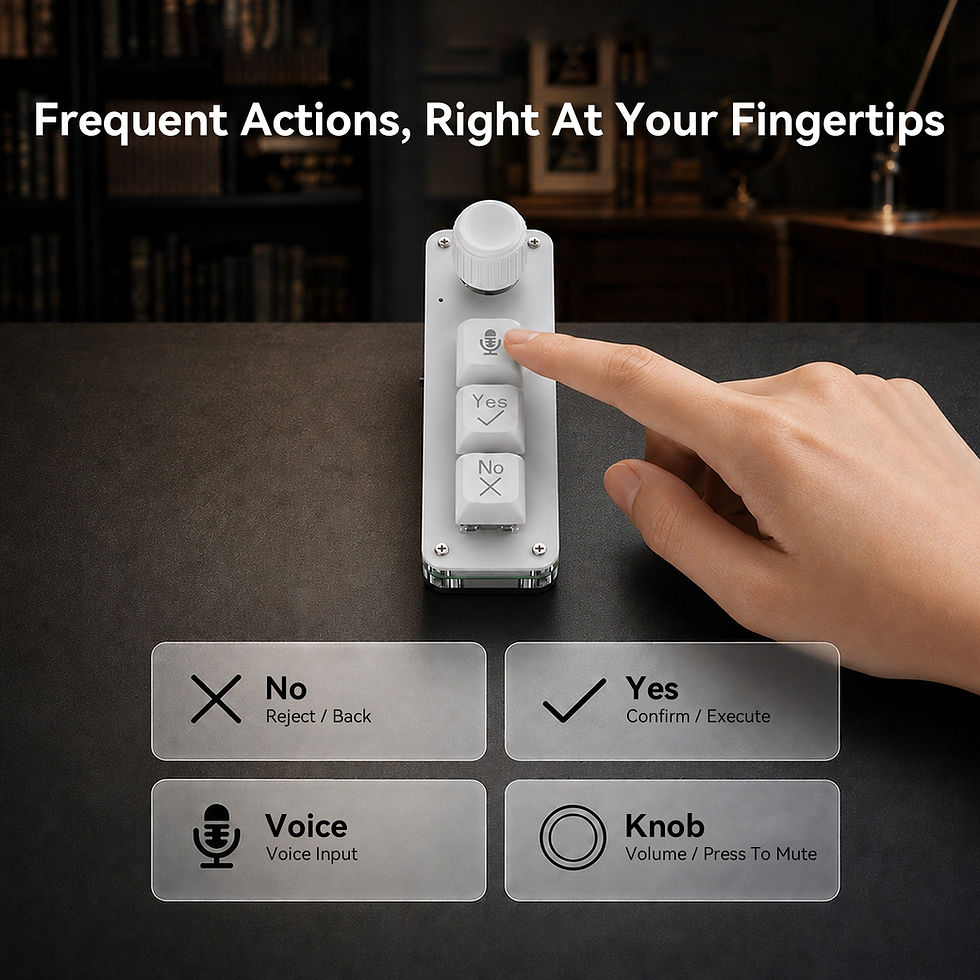
The PicoKey is a compact computer input device with three mechanical keys, a rotary knob and a built-in microphone. Its default layout gives the user a physical starting point for voice input, confirmation, cancellation and volume control.
Voice key: press and hold to capture speech through the keypad microphone, then release when finished.
Yes key: can provide a confirmation, send or execute input where the active shortcut is supported.
No key: can provide cancel, reject, delete or return behavior according to the saved mapping and current app.
Rotary knob: turns for volume adjustment and presses for mute by default.
Onboard memory: normally retains saved mappings when the keypad is moved to another compatible device.
The labels are not universal AI commands. The result depends on which window has focus and which key action the application accepts. Review the transcription or proposed code change before pressing a mapped confirmation key.
Built-in microphone does not mean built-in speech-to-text
The microphone captures sound, but the operating system or active application performs speech recognition. Language availability, punctuation and accuracy therefore depend on that software, room noise, speaking distance and input settings. The keypad does not turn spoken words into code by itself.
This distinction is useful when comparing products. Some workflow keypads simply trigger a computer microphone or third-party dictation tool. PicoKey includes a microphone, but it still relies on compatible host software for transcription and on the active AI or productivity app for any response.

How to configure the 2.4G version
Connect the keypad to a Windows computer with the supplied USB-A to USB-C data cable.
Download the matching configuration package from the SIKAI keyboard software support page.
Open the software, confirm the device is detected and assign the three keys and knob.
Save the configuration to the keypad’s onboard memory.
Move the side switch to the wireless position and insert the included 2.4G USB receiver.
Wait for the automatic connection, then test Voice, Yes, No and the knob inside a non-critical document or prompt.
The current configuration software for this AI voice model is Windows-only. After mappings are saved, they may work on another compatible device, but shortcuts can differ by operating system. When preparing Mac-oriented mappings in the Windows software, Win corresponds to Command and Left Alt corresponds to Option. See the SIKAI keyboard software and setup page for the current downloads and instructions.
Where the wireless version earns its place
AI-assisted coding: speak a feature request or bug description, review the transcript, then use mapped review controls.
Standing desks: reposition the keypad without rerouting a permanent cable.
Creative work: keep voice notes and volume control beside a drawing tablet or editing surface.
Presentations and large displays: hold the small controller while reviewing content away from the main keyboard.
Shared or compact desks: move the keypad aside when it is not part of the current task.
Voice input is generally better for natural-language requirements than for dictating exact code syntax. It can help capture context quickly, but important filenames, commands, values and destructive actions should still be checked manually.
Who may prefer the wired version
A wired unit may be the better purchase when the keypad has a permanent place, every USB receiver slot matters, or you do not want to think about battery state. It is also the required connection for customization, so buyers who rarely move the device may gain little from the wireless option.
You may not need either version if you already have a programmable macro pad and a satisfactory microphone, or if your AI workflow is mostly short typed prompts. The PicoKey is a focused controller, not a replacement for a full keyboard, mouse or careful review.
Compatibility and before you buy

Choose the exact connection option: Wired or 2.4G Wireless + Wired.
The wireless package includes the PicoKey, USB-A to USB-C cable and 2.4G receiver; the wired package does not include the receiver.
Product size is approximately 107 mm long and 35 mm wide.
Bluetooth is not available.
Custom key setup requires a Windows computer and wired connection.
Voice transcription requires a compatible operating-system or application feature.
AI accounts, subscriptions and direct platform integrations are not included.
Black and white product variants and current bundle availability should be confirmed on the SikaiCase product page.
Frequently asked questions
1. Is this a full wireless keyboard?
No. It is a compact three-key voice macro keypad with a knob, designed to complement a normal keyboard.
2. Does the wireless version use Bluetooth?
No. It uses the included 2.4G USB receiver. There is no Bluetooth mode.
3. Can the 2.4G model also work by cable?
Yes. It supports both receiver-based 2.4G use and wired USB operation.
4. Can I customize it while connected wirelessly?
No. Key and knob customization must first be completed by cable with the current Windows configuration software.
5. Does the microphone transcribe speech by itself?
No. It captures audio. Speech-to-text is handled by the operating system or active application.
6. Do Yes and No work in every AI app?
Not automatically. Their behavior depends on the saved key mapping, the focused window and the shortcuts supported by that application.
7. Can I configure it on macOS?
The current configuration software for this model is Windows-only. Saved mappings may then be used on another compatible device, with Mac shortcut differences tested first.
8. How long does the wireless battery last?
SIKAI laboratory testing gives a reference of about one week at roughly three hours of daily use. Real runtime varies with use and environment.
9. What comes with the wireless version?
The 2.4G Wireless + Wired option includes the keypad, a USB-A to USB-C data cable and a USB 2.4G receiver.
10. Is PicoKey officially integrated with ChatGPT, Codex, Claude or Cursor?
No. It is an independent programmable input product. Compatibility depends on standard computer inputs, mapped shortcuts and the capabilities of the software you use.
Final verdict
For a fixed workstation, the wired PicoKey is the simpler choice. For users who regularly move between a main keyboard, laptop, tablet area or standing position, the 2.4G Wireless + Wired version adds meaningful placement flexibility while preserving a cable fallback. In both cases, the real value comes from a carefully mapped workflow and disciplined review—not from treating the keypad as an AI system.
Compare current connection options, colors and package contents on the PicoKey Voice Macro Keypad product page at SikaiCase. Product ordering and checkout are handled by the SikaiCase store.
SIKAI Global provides multilingual brand information, software guidance and customer-support content. It does not sell this product or process checkout.
OpenAI, ChatGPT, Codex, Anthropic, Claude, Cursor and other product names are trademarks of their respective owners. PicoKey is an independent product brand and is not affiliated with, authorized by or endorsed by those platforms.


